Token Weather
A live forecast of your context window, drawn above the prompt.
Before you install
A mod is code that runs inside Claude Code with your permissions. It can read and change your files, run programs, and use the network. Install mods only from authors you trust.
GoodPrompts doesn't review the code. Below is what it uses, from a scan of the commit we checked; claude plugin validate checks it on your computer.
What its code uses
- hooks:
- session.start, turn.complete, ui.render{component=AbovePrompt}
- calls:
- $.session.usage, $.ui.invalidate, $.ui.resolve
From the code at 569c528, checked Oct 24, 2026.
Get this mod
Run this at the Claude Code prompt (Claude Code 2.1.287 or later). It asks before adding the GoodPrompts marketplace, then lets you choose where to install.
/plugin install token-weather --marketplace https://good-prompts.com/api/mods/marketplace.jsonAlready added GoodPrompts?
claude plugin install token-weather@goodpromptsUpdate it later
claude plugin update token-weather@goodpromptsUpdates arrive when the author changes the version (now 0.1.0).
Check it yourself first
git clone --depth 1 --branch main https://github.com/anthropics/claude-code-playground.git && claude plugin validate ./claude-code-playground/claude-code/mods/token-weatherCode checked at 569c528 on Oct 24, 2026, when it was published. Installs the latest code on main. GoodPrompts doesn't check it again, so it may have changed since. See changes since then
/plugin install token-weather --marketplace https://good-prompts.com/api/mods/marketplace.jsonREADME
Token Weather
A Claude Code mod that draws a live forecast of your context window in the band above the prompt. We're sharing it as the smallest of the three mods here: one hooks module that reads real usage figures and draws one line of UI.
What this shows
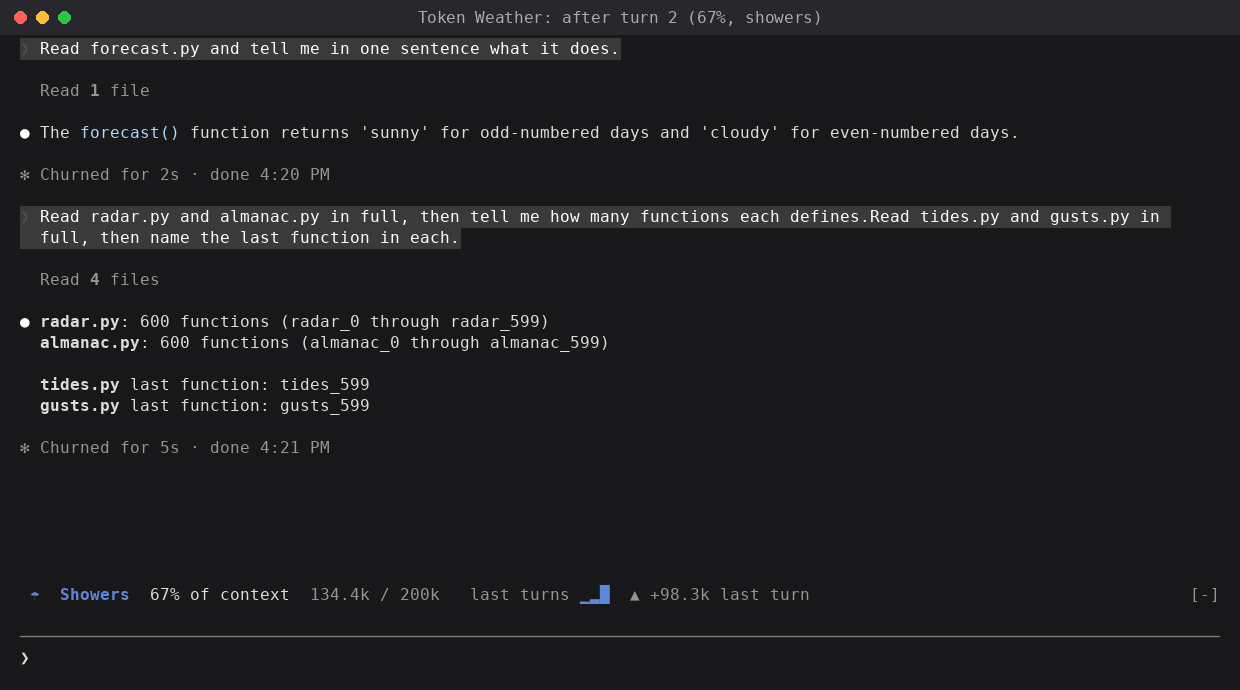
☂ Showers 67% of context 134.4k / 200k last turns ▁▂█ ▲ +98.3k last turn
After each turn, the band shows:
- a weather icon and word for how full the window is,
- the percentage used, and the tokens used out of the window,
- a chart of the last 12 turns, drawn with block characters, and
- how much the last turn added.
| Used | Forecast |
|---|---|
| under 25% | ☀ Clear |
| 25–49% | ☁ Cloudy |
| 50–74% | ☂ Showers |
| 75–89% | ☇ Storm |
| 90% up | ↯ Compact soon |
The numbers are real, not estimated. After each main-loop turn, the mod calls $.session.usage() and reads context:
tokens: the input tokens the last response was answered over (uncached, cache-written and cache-read together),window: the context window of the session's model, andpercent:tokensoverwindow.
These are the same figures the status line shows (total_input_tokens, context_window_size, used_percentage). The call is free, because the mod doesn't ask for a breakdown, so it sends no token-count request.
| Hook | What it does |
|---|---|
session.start | Takes a first reading, so the band shows before the first turn. |
turn.complete | Takes a reading after each main-loop turn. Subagent turns are skipped. |
ui.render with {component: "AbovePrompt"} | Draws the band as one line. |
Demo
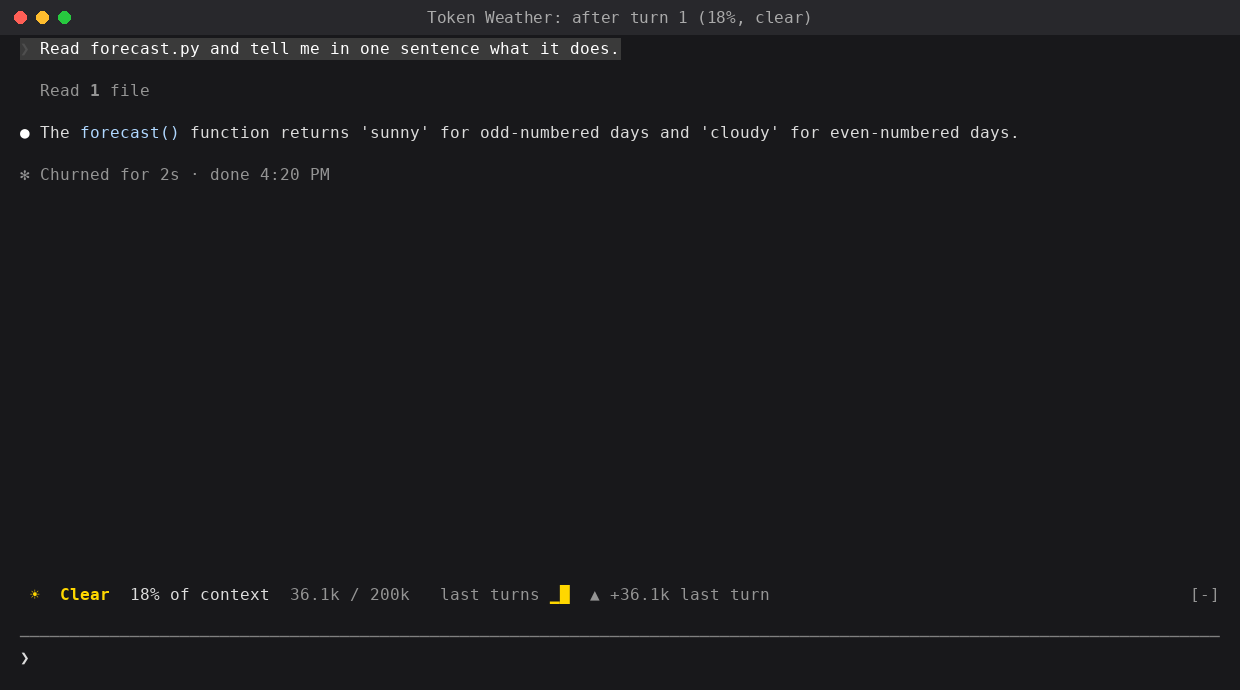
After the first turn, 18% full:
After reading four large files, 67% full:
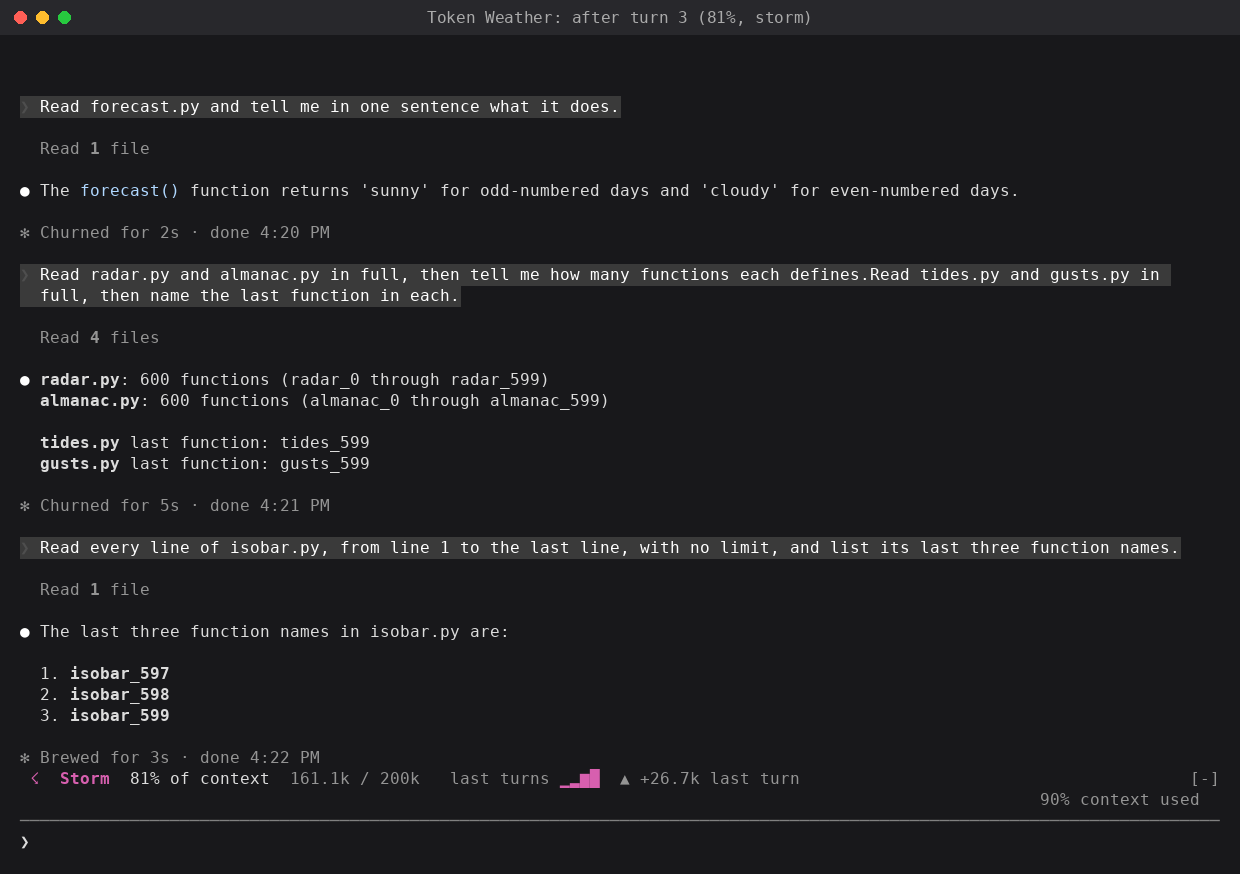
After one more file, 81% full. Claude Code's own notice reads 90%, because it counts toward the auto-compact point (see the limitations):
How it was built
-
Model: built with Claude in Claude Code. The test runs and screenshots used Claude Haiku 4.5, because its 200k window shows the forecast change within a few turns. The mod itself doesn't call a model.
-
Prompt(s): the mod started as one of ten ideas Claude wrote for mods. This is the idea as written:
Token Weather. A live forecast of your context window. A band above the prompt draws a small chart of context use for each turn, as weather icons. It's clear when the window is mostly empty, and stormy when it's nearly full. It uses
ui.renderon theAbovePromptcomponent, with theSvgelement, and it updates onturn.complete. I haven't confirmed which event or call gives the token counts, so that needs a check. Developers would share it because it looks good in a screenshot, and it answers "why did Claude forget that?" at a glance. The status line only shows text. A weekend build.The build prompt, which picked this idea and two others by number:
implement 1,2,7. give me zips for them. test them in claude code and get me screenshots of what they look like when used.
-
Transcript: not shared. The build ran in an internal workspace.
-
Iterations:
- The idea left open where the token counts come from. The build found
$.session.usage(), which returns the same figures as the status line, so the mod shows real numbers rather than an estimate. - The idea drew the chart with the
Svgelement. The terminal can't drawSvg, so the chart is a row of block characters. - The first icons were emoji, which weren't in the test terminal's font. The mod uses single-width text symbols instead, which line up in any terminal font.
- Tested in Claude Code on a test repo of five 42 KB source files: three turns, each reading more files, moved the band from ☀ 18%, to ☂ 67%, to ☇ 81%.
- The idea left open where the token counts come from. The build found
Run it
Requirements:
- Claude Code 2.1.287 or later, where mods load by default. The mod was built and tested on 2.1.280, and
claude plugin validatepasses on 2.1.285. - A terminal.
AbovePromptis drawn on the terminal surface only.
No environment variables or configuration.
Steps:
-
Clone this repository and go to this folder's parent:
git clone https://github.com/anthropics/claude-code-playground.git cd claude-code-playground/claude-code/mods -
Check the plugin:
claude plugin validate ./token-weather -
Try it for one session:
claude --plugin-dir ./token-weatherOr install it, with the other mods here, from the local marketplace in this folder (see the mods README):
claude plugin marketplace add ./ claude plugin install token-weather@claude-code-playground-mods --scope user -
Work as normal. The band updates after each turn.
Notes / limitations
- The percentage is of the full window. Claude Code's own "context used" notice counts against the auto-compact point, which is lower, so the two can differ. In testing, the band read 81% when the notice read 90%.
- The band updates once per turn, not during a turn.
- The chart's bars are relative to the fullest turn shown, so growth shows even at low fill. The percentage is the absolute figure.
- The history resets when the session starts, or when the plugin reloads.
- On a 1M-token window, ordinary work stays at ☀ for a long time. That's accurate.
- One band per session. Another plugin that draws
AbovePromptcompetes for the same band. - Before the first response, the band reads 0%, because no response has reported usage yet.
Dependencies
| Name | Version | License (SPDX) | Source |
|---|---|---|---|
| None |
Third-party notices
None.
Shared as-is as part of claude-code-playground. Not an official Anthropic product; no support or maintenance is implied. See the root README and LICENSE.